
5 Steps for Keyword Research with Google Keyword Planner
Learn keyword research with Google Keyword Planner in 5 steps: sign up for Google AdWords, open the tool, enter keywords, read the results and download.

For internet marketers, finding the right keywords to optimize a website is essential. Good optimization can push a website to the top of search results, which makes the business behind it easy for internet users to find. The easier your business is to find in search engines, the more revenue you can expect. Here is how to do keyword research with Google Keyword Planner:
Contents
Sign Up for Google AdWords
The first step in keyword research with Google Keyword Planner is to sign up for Google AdWords. AdWords is a Google service that advertisers can use to research the market. You can sign up with a Gmail account. (Running AdWords ads is recommended because it shows the average monthly search volume.)
Read also: 4 Ways to Create a Free Blog and Website (Google)
Open the Tools Menu
Once you have signed up for Google AdWords, the next step is to open the Tools menu. A submenu will appear. Choose Keyword Planner. After you click it, you will see several options. Choose "search for new keyword and ad group ideas."
Enter Your Keywords
Next, enter keywords that match the business you run. Do not forget to edit the targeting section, which defines your business's target market. Then set the location to Indonesia and the language to Indonesian.
View the Results
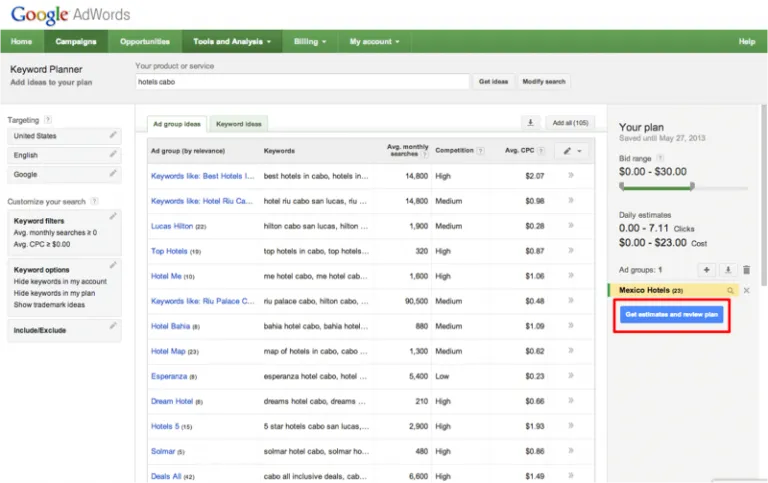
After you enter your keywords and adjust settings such as targeting, location and language, you can see the results. On this page you can view the trend of the keywords you searched. Click Keyword ideas, especially if you are looking at keywords from the last 2 months. In the results section you will find the level of advertiser competition and the CPC (cost per click) value for each keyword.
Download
To keep all of the keyword results, you can download them. The downloaded keyword file comes as an Excel CSV.
Keyword research should never be careless, because that wastes your time and effort. Research like this is the best way to optimize your website, far better than picking keywords at random. We hope the steps above for keyword research with Google Keyword Planner are useful to you.
Read also: The Little-Known History of Bread